


What is Lock License:
Lock License flash drives by Nexcopy are drives where the user can set write protection after their data load. This places the USB drive into a read-only state. When the USB is read-only, the files on the drive cannot be changed, manipulated, deleted, or formatted off the drive. The write protection feature is a hardware-based solution configured at the controller level of the device.
Lock License refers to a license Nexcopy places on the drive to make it compatible with the Nexcopy utility used to lock and unlock the drive.
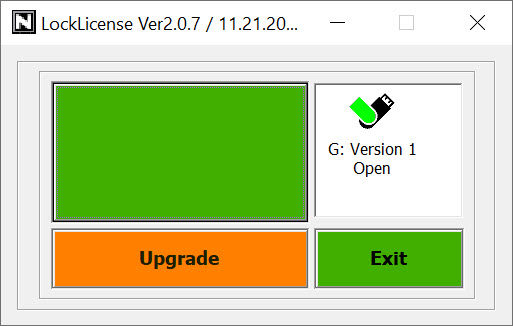
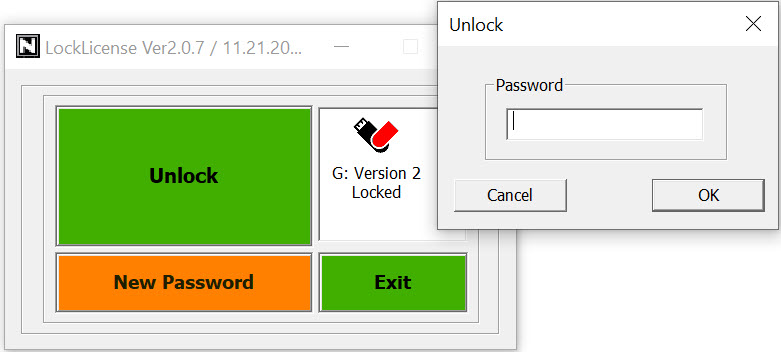
Nexcopy offers two software solutions to set write protection on Lock License drives. Nexcopy provides both a GUI (Graphical User Interface) utility and a command line utility to control the state of the drive. The command line tool allows users to integrate the write protection process directly into their own workflow procedures.
In addition, the Lock License technology gives the user the ability to unlock the drive, make updates or changes to the device, and relock the drive to restore read-only status.
The user may perform the locking process using either the GUI utility or command line utility. This technology was originally released in the spring of 2013.
Security Issue:
Nexcopy Lock License drives have been a tremendous success since release. However, the original solution had a security issue because only one tool, or method, was used for all customers to lock and unlock drives. Said another way, any user with the utility could unlock a Lock License drive from another customer. With the upcoming release, this security issue is resolved.
The Upgrade:
The upgrade consists of two elements. The first element is a fundamental change in how the technology works. Starting October 1, 2020 all Lock License drives default to a read-only or write-protected state. Whenever power is applied to the device, the drive is automatically read-only.
The second element to the October 1st upgrade is a required password to remove the write protection from the drive. First-time use of the drive requires the operator to create and enter a password. From that point forward, only that password can remove the write protection for the specific drive.
Note: The drive is always readable and no password is required to access data from the Lock License flash drive. The password is only related to making the drive writable.
GUI Screen Shots
Command Line Screen Shot
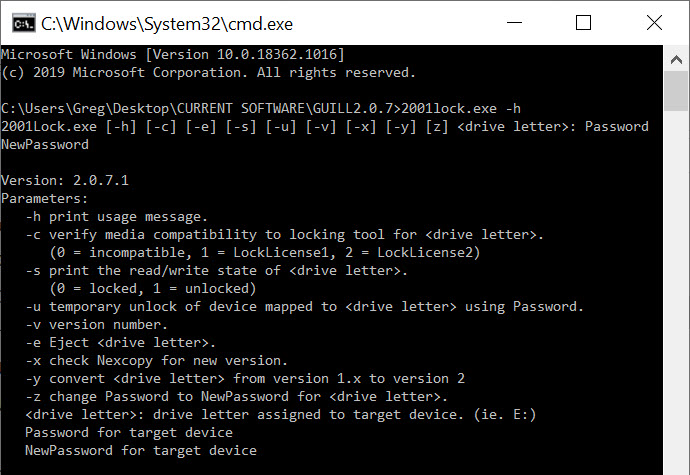
Each Lock License drive deployed since its inception in 2013 has the ability to programmatically upgrade to this more secure solution. The GUI and command line tools include automatic upgrade features to update any previous version of a Lock License drive. This upgrade is required for all Lock License drives because the previous technology, due to the noted security issue, will no longer be supported by Nexcopy. GUI and command line tool version 2.0.6 or higher will be required to operate Lock License drives.
Availability:
The Lock License drives come in a variety of body styles, colors, and capacities. However, Nexcopy only carries the Oxford swivel style with a black body and white clip as in-stock and ready-to-ship product. For all other body styles and colors, a special-order lead time of 7–10 business days will apply. Those styles can be found here.
Our in-stock media is comprised of:
- USB 2.0 media = 2GB and 4GB
- USB 3.0 media = 8GB, 16GB, 32GB, 64GB, and 128GB
Please keep in mind logo printing and branding are free with the purchase of Lock License drives.
The updated Lock License utility became available on the Nexcopy support page starting October 1, 2020.
Use case for Lock License drives:
With the fundamental change to Lock License drives defaulting to a write-protected state, this product becomes an ideal solution for large organizations or government agencies requiring secure USB devices. Because the USB is never writable on its own, it becomes impossible for a virus to jump onto the drive when first connected to any host computer or device. This security feature makes the spread of malware through a Nexcopy Lock License drive significantly more difficult.
Lock License drives are best suited for smaller quantity purchases where the data load is completed manually at the customer site.
For larger scale production, Nexcopy recommends purchasing the PRO Series duplicators which support write protection. Note: The PRO duplicator and software do not require a Lock License drive.
Lock License drives are designed for users who need read-only media but also require the ability to unlock, update, and relock the drive in the field. With the command line utility, this workflow can be integrated directly into an end-user software update process. Because Lock License drives always default back to a write-protected state, the update process will never leave the drive writable.
Consideration:
If your organization owns a PRO Series duplicator and requires write protection only at the time of duplication, a Lock License versioned drive is not required. The PRO Series duplicator configures write protection to Nexcopy media through the PRO Drive Manager software. However, if your organization requires the ability to unlock and relock the drive remotely, then be sure to request a Lock License drive at the time of ordering. This is the primary situation where a PRO Series equipment owner would specifically request a Lock License drive.
Product page for Lock License USB flash drives.