


How to Choose the Right USB Flash Drive Duplicator
The optical drive is disappearing in laptops and computers and as a result, the USB flash drive, or thumb drive, is the ideal tool for sharing data in the year 2026. The USB flash drive is a small, easily transportable device which holds vast amounts of data storage capacity. Flash drives are universal devices used in Windows computers, Apple computers, Linux computers, Smart TVs, car stereos, and any other device with a USB port. The universal acceptance of the USB flash drive in conjunction with the optical drive disappearing explains their continued popularity.
Considering the lack of optical drives found in new computers, the USB is replacing the CD-R for duplication needs. In fact, some companies require the use of many flash drives but with different information on each thumb drive, also known as data publishing. There are duplicators for each type of situation and this USB flash drive duplicator guide will help determine which type of USB copier is best for your needs.
Copying USB sticks manually one at a time is a time-consuming and expensive process. Using a USB flash drive duplicator, also called a USB copier, increases efficiency and decreases costs.
Two Categories of USB Flash Drive Duplicators
- PC Based USB Duplicators
- Standalone USB Duplicators
PC based or computer connected USB duplicators
Using the processing power of a computer, the PC-based USB duplicators are the next step over making one-off copies manually. The PC-based duplicators are typically less expensive than standalone systems because part of the expense of building a standalone USB duplicator, namely the processor, is already included with the host PC.
Computer-based systems provide more control over USB duplication because the GUI software, or Graphical User Interface, provides alternative ways to access the source data. For example, copying data from a source folder on the host computer, from a physical flash drive connected to the computer, or from a digital master stored on the computer hard drive.
In the year 2026 every computer comes standard with USB 3.0 or USB 3.1 ports, allowing PC-based USB duplicators to perform equally as fast as standalone systems from years past.
Copy speeds between PC-connected and standalone systems will perform similarly when using USB 3.0 media. When using USB 2.0 media, the standalone USB duplicators have a speed advantage over the PC-connected systems.
Standalone USB Flash Drive Duplicators
As the name implies, these standalone systems are OS-less and do not require a computer to function. Standalone USB duplicators use an internal processor which handles all the work of data duplication. For this reason, standalone systems are typically more expensive than PC-based duplicator systems.
If simplicity is the number one goal when buying a USB duplicator, standalone systems are best.
When speed is the highest priority, consider the type of flash drive technology being used. As mentioned earlier, when using USB 3.0 media with a PC-based system, speed performance will be approximately the same. At the time of this post, duplication speed is around 1GB per minute to all targets regardless of system being used. However, when using USB 2.0 media, standalone systems do have an advantage. Copy time when using a standalone system with USB 2.0 media is generally one minute and thirty seconds per GB of data. When calculating larger capacity flash drives, the extra time can really add up.
The Three Sub-Categories
- Read Only or Write Protected Flash Drives
- Network Connection Requirements
- Log File Reporting
Read Only or Write Protected Flash Drive
A key element in defining the type of USB duplicator to purchase is whether the USB drives must be read-only. Read-only is a term indicating the data on the drive can only be read; the data cannot be deleted or formatted off the drive. Said another way, the data is permanently stored on the flash drive. To make a USB flash drive read-only, or write protected, a specific vendor command is sent to the flash drive for configuration. These vendor commands require a computer system to send the special commands. Creating read-only flash drives requires a PC-based duplicator and computer environment.
Network Connection Requirements
Network access requires a PC-based system. The most common need for a network duplicator is sending digital copies, such as image files, over the network to the host computer running the duplicator. Standalone systems are OS-less and do not have the capability of communicating over a network.
Log File Reporting
An organization might require proof of performance for duplication work performed. In order to provide proof of performance, a log file is typically generated by PC-connected systems. Standalone systems do not have onboard storage for log files, nor the ability to communicate with another computer, and therefore do not provide log file options. PC-based USB duplicators generate log files which include performance information such as the number of copies created, number of failed copies, date and time of duplication work, along with additional metadata.
Important Production Requirements to Ask Yourself
Ask yourself these top 10 questions before making any purchase decision and get the most out of this USB flash drive duplicator buyer’s guide:
- Number of copies needed per day or week?
- What is the turnaround time for production?
- Is the operator non-technical?
- Must the duplicator be portable?
- Are USB 2.0 or USB 3.0 drives being used?
- Are read-only flash drives required?
- Should the USB have multiple partitions?
- Is there a benefit to creating a USB CD-ROM flash drive?
- Will data streaming be a requirement?
- Will an image file be used as the source?
Comments / Answers
Number of copies needed per day or week?
Answering this question helps determine the size of USB duplicator needed. Keep in mind standalone systems perform asynchronous copying, meaning the copy process begins the moment a USB drive is connected to the system. Typically, this means the first drive finishes before the last drive is connected, depending on data load size.
What is the turnaround time for production?
Regardless of data load size, if quick turnaround times are the priority then a USB duplicator with more sockets is the best option. However, there is a relationship between the number of sockets, turnaround time, and data load size. For example, a 50GB data load may take nearly one hour using USB 3.0 media, meaning some operations may require multiple units.
Is the operator non-technical?
Standalone systems work with the click of a single button. The simple one-button operation makes them the easiest to operate. For example, a church might have volunteers operating the duplication equipment, making a standalone system the better choice. Keep in mind PC-based systems are still relatively easy to operate, just not as simple as standalone solutions.
Must the duplicator be portable?
Most duplicators are portable and fit inside a travel suitcase; however, some models have over 100 sockets and are not portable at all. For example, a company may run seminars in different cities and provide copies of live seminars for attendees.
Are USB 2.0 or USB 3.0 drives being used?
If speed is the highest priority, consider the earlier comments regarding USB 2.0 and USB 3.0 media in relation to duplication speed. In some situations the media may be USB 2.0, but required functions such as read-only status are so important that a PC-connected system becomes the only option.
Are read-only flash drives required?
When USB flash drives must be read-only, or write protected, PC-based systems are the only option. This is because specific vendor commands must be sent to the flash drive for proper configuration. Unfortunately, there is no universal command to make a USB flash drive read-only. Each flash drive manufacturer has their own command set used to configure the device.
Should the USB have multiple partitions?
A multi-partition thumb drive requires a PC-connected USB duplicator because specific vendor commands must be sent from the host computer. There is no universal command to configure multiple partitions on a USB flash drive. Each flash drive manufacturer uses its own command set for such configurations.
Is there a benefit to creating a USB CD-ROM flash drive?
When the USB flash drive must appear as a USB CD-ROM disc drive, PC-based systems are the only option. Specific vendor commands must be sent to the flash drive for proper configuration. Unfortunately, there is no universal command to make a USB flash drive appear as a CD-ROM device. Each flash drive manufacturer uses its own commands to configure the drive accordingly.
Will data streaming be a requirement?
Standalone systems cannot communicate with an operating system and therefore a PC-connected system is the only option for data streaming, also known as data publishing. Unique data streaming means different sets of files are copied to each individual flash drive. For example, a medical facility transitioning away from CD-ROM devices may use a PC-based USB duplicator supporting data streaming so each patient receives a USB drive containing unique information.
Will an image file be used as the source?
Companies may use different locations to generate master content, or require a digital master before duplication begins. This digital master takes the form of an image file, or .img file type, which is a binary copy of the physical device. PC-based USB duplicators can use image files as the duplication source, whereas standalone systems cannot because they do not have access to digital image files. Standalone systems use a physical master instead.
Putting It All Together
Choosing the right USB flash drive duplicator will optimize performance and reduce company costs. Although this buyer’s guide for USB copier equipment does not answer every question, it will help identify the right topics to consider so when the time comes to purchase, you will be informed and ready to ask the right questions.
Choose a reputable company with contact information and technical support information clearly listed on their website. If you cannot find a physical address on the website, do not buy from that company. Any reputable business should not be afraid to list all of their contact information.
USB Flash Drive Duplicator Buyers Guide – Nexcopy Solutions
Nexcopy Incorporated, established in 2004, offers both standalone and PC-based USB flash drive duplicators with features supporting all the topics mentioned in this article.
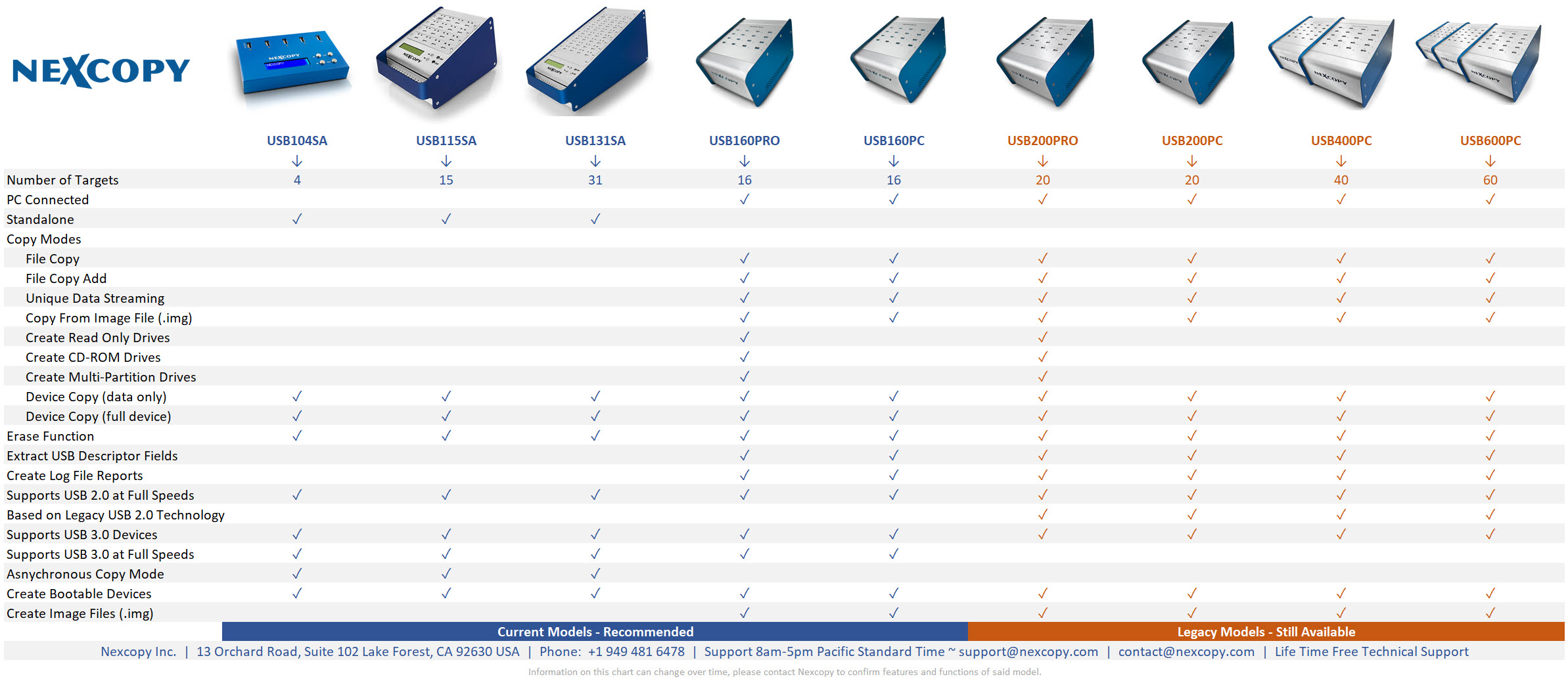
- USB104SA – Standalone 1:4
- USB115SA – Standalone 1:15
- USB131SA – Standalone 1:31
- USB160PRO – PC Based USB 3.0 – 16 Target – USB Read Only + Advanced Functions
- USB160PC – PC Based USB 3.0 – 16 Target – Standard Version
- USB200PRO – PC Based USB 2.0 (Legacy) – 20 Target – USB Read Only + Advanced Functions
- USB200PC – PC Based USB 2.0 – 20 Target Standard Version
- USB400PC – PC Based USB 2.0 – 40 Target Standard Version
- USB600PC – PC Based USB 2.0 – 60 Target Standard Version
Check the chart below to find the Nexcopy product which best meets your needs. Please contact Nexcopy for additional details.
Please visit the Nexcopy USB Flash Drive Duplicator page for further details about the different features and models listed in this article.