


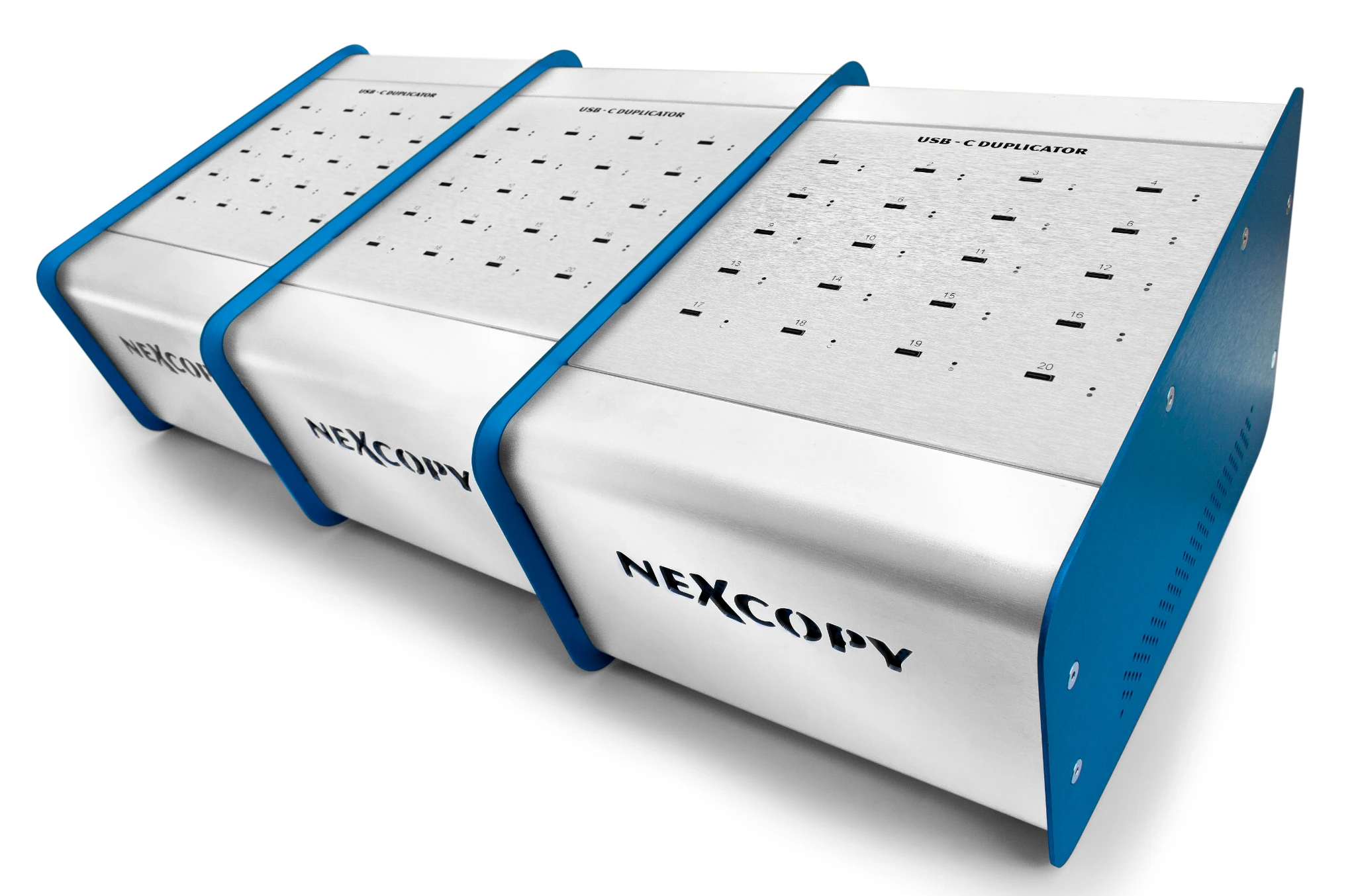
(front/top view)
The USB-C600PC Technical Datasheet provides detailed engineering specifications, system behavior, and operational characteristics for the Nexcopy USB-C600PC duplicator. This page is intended for technical evaluators, IT professionals, and organizations that require deeper visibility into how the system functions beyond what is covered on the product overview page.
This page documents engineering-level characteristics. For pricing, availability, and overview details, see the USB-C600PC product page.
System Overview
The USB-C600PC is a PC-based USB-C duplication system designed for controlled, repeatable production workflows. The system operates as a host-managed duplication platform, using a Windows-based application to manage connected target devices, enforce copy operations, and apply device-level behaviors such as partition configuration and write protection where supported by media.
Technical Specifications
- Model
- USB-C600PC
- Product class
- PC-based duplicator (Standard Series)
- Target capacity
- 60 USB-C devices per session
- Supported media
- USB-C 3.0 and USB-C 2.0 flash drives
- Connectivity
- USB 2.0
- Host USB ports required
- Four high-speed USB ports (USB 2.0 or USB 3.0)
- Supported operating systems
- Windows 11 and later (supported environment)
- Legacy OS compatibility
- Software may run on older Windows versions; however, Nexcopy does not provide support for operating systems outside the supported environment.
- System architecture
- 32-bit application architecture
- Minimum system requirements
- 1.8 GHz dual-core processor or better; 1 GB–2 GB RAM
- Software framework
- Microsoft .NET Framework (automatically installed if not present)
- Hardware configuration
- Three-module architecture; supports combined operation or independent use
- Dimensions
- Three duplicators – Each: 7.87 x 7.87 x 7.87 in (200 mm × 200 mm × 130 mm)
- Weight
- Three duplicators – Each: 6.2 lb / 2.5 kg
- Software updates
- Lifetime updates included
Media & Compatibility
The USB-C600PC operates using standard mass-storage protocols rather than controller-level configuration. As a result, it is compatible with virtually all USB-C flash drives that enumerate as standard USB storage devices, allowing organizations to use existing USB-C inventory without controller restrictions.
- Supported media
- Compatible with USB-C 2.0 and USB-C 3.0 flash drives that enumerate as standard mass-storage devices
- Controller restrictions
- None for standard duplication workflows
- Media sourcing
- Customers may use their own USB-C flash drives from any manufacturer
- Advanced media features
- Controller-level features such as hardware write protection, partition control, and descriptor programming require PRO Series configuration and supported media
- Upgrade path
- The USB-C600PC can be software-configured to operate as three independent USB-C200PRO systems, enabling advanced controller-level features when required
Copy Methods & Data Workflows
- File copy
- Standard file-level duplication from host system to connected USB-C targets
- Full device copy
- Bit-for-bit device-level duplication, including file system structures and boot sectors
- Short device copy
- Optimized device copy that writes only allocated sectors to improve performance on partially used media
- IMG file creation
- Generate device image files that capture boot code, partition structures, file systems, and data
- IMG file copy
- Write USB-specific image files (.IMG) to target devices for bootable or structured workflows
- File copy add
- Append new files to existing content on target devices without overwriting prior data
- Unique Data Streaming
- Supports individualized data per target device during a single production job (e.g., licenses, certificates, identifiers)
- Extract files from USB-C media
- Read and copy files from connected USB-C devices to host system storage for review or recovery
Indicators & Controls
- System indicators
- LED indicators on the hardware sockets, with real-time status feedback provided through the Drive Manager GUI
- Physical controls
- System operation is managed through the Drive Manager software, with physical interaction limited to inserting and removing USB-C media
Power & Electrical
- UPS recommended
- Helps prevent job interruption during power loss (not required)
- Power quality
- Operate on stable AC power; avoid frequent brownouts or unstable generators
- Power input
- 120V / 240V auto-detecting power supply
Environment
- Indoor use only
- Avoid outdoor, vehicle, or uncontrolled warehouse environments
- Operating altitude
- Up to 6,500 ft (2,000 m)
- Operating temperature
- 41°F–122°F (5°C–50°C)
- Operating humidity
- 15% to 85% (non-condensing)
- Storage temperature
- 14°F to 140°F (-10°C to 60°C)
- Storage humidity
- 10% to 90% (non-condensing)
- Ventilation required
- Do not obstruct airflow around the unit during operation
Cleanliness & Maintenance
- Dust-free environment recommended
- Excessive dust may reduce socket reliability over time
- Socket maintenance
- USB-C target sockets should be inspected and cleaned periodically based on usage using electrical contact cleaner and compressed air
Packaging & Logistics
- Dimensions
- Three cartons – Each: 14 in × 11 in × 9 in (356 mm × 280 mm × 229 mm)
- Unit packaged weight
- Three cartons – Each: 7.2 lb / 3.3 kg
- DIM weight
- Three cartons – Each: 12 lb / 5.5 kg
- HS Code
- 8471.80 (Automatic data processing units and peripherals)
- Country of origin
- United States
- Incoterms
- Ex Works (Lake Forest, CA, USA)
- Package materials
- Corrugated cardboard carton with internal protective inserts
- Palletization
- Optional; available upon request. Not required for standard orders.
- Stacking limitations
- No special stacking limitations under normal handling conditions
Warranty & Support
- Warranty
- One-year warranty. Sockets are considered consumable after 30 days
- Software updates
- Lifetime updates included
- Technical support
- Lifetime technical support via email or phone. See the warranty page for equipment warranty details
Additional Information
This technical datasheet provides the standard technical specifications for the USB-C600PC platform. If your application requires additional detail, environment-specific clarification, or advanced configuration guidance, Nexcopy technical support can provide further documentation upon request.
If you need purchasing details, pricing, or an overview of use cases, return to the USB-C600PC product page.